How to manage my adoption settings
In CrowdFarming, you can find projects whereby you receive a single shipment for your adoption, or projects where you can receive the harvest in several deliveries. This difference usually depends on whether the Farmer’s products mature all at once or gradually.
You can manage all aspects of your adoption directly from your Garden — accessible anytime from your account.
- Log in to your CrowdFarming account
- Click on your profile icon or name in the top right corner
- Go to Garden and select the relevant adoption
Change your delivery frequency
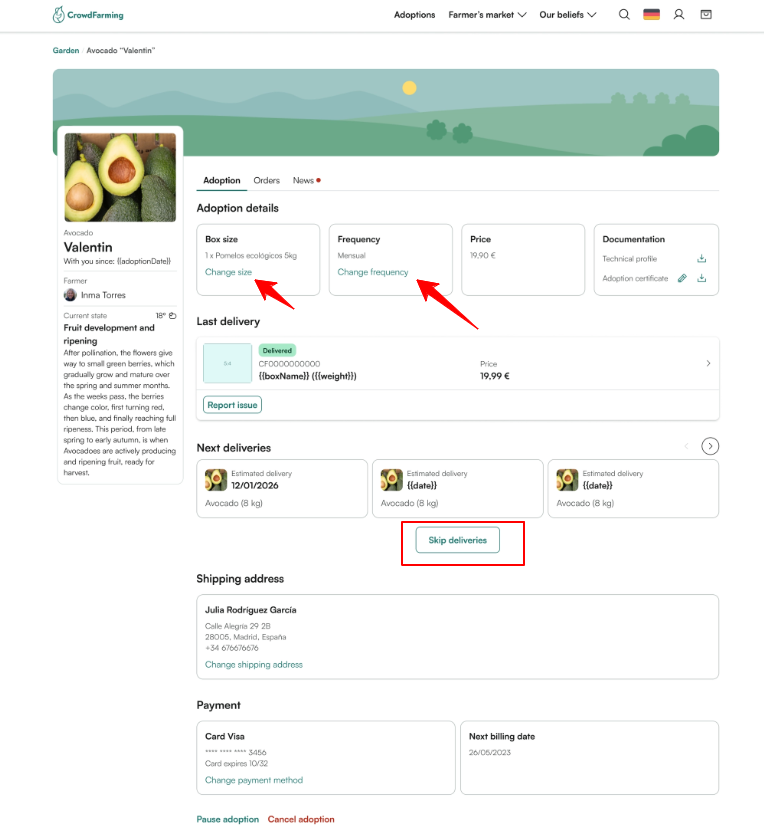
Choose how often you receive your boxes — every week, every 2 weeks, or every month. Click Change frequency and save your selection.
Change your box size
Click Change size, select your preferred size and save. The change applies to your next generated order.
View and manage upcoming deliveries
Your scheduled deliveries are listed under Upcoming deliveries. For each delivery you can:
- Keep it — no action needed
- Skip it — select the delivery and click Skip
⚠️ Orders are generated one week before shipment. Once generated, manage them from your Orders section instead.
Pause or cancel your adoption
Further down the adoption page you'll find the following options:
Pause for a season Suspends your adoption for the entire upcoming season. You won't be charged during that period. Your adoption remains in your Garden and can be reactivated when the next season begins.
Cancel the adoption Ends your adoption permanently, including all future deliveries and auto-renewal. This can be done at any time.
💡 Need to cancel a specific generated order rather than the full adoption? Go to your Orders section.
❓ Questions? Contact our team →
Our new adoption model — what you need to know
Will I receive the harvest of my own adoption?